
Thoughtful conversation
Dreamer
A calm, contemporary profile with a reflective visual style.
Joyland AI brings character discovery, conversation and character-building controls into one experience. The clearest way to begin is to decide what sort of exchange you want before choosing a profile. A grounded everyday conversation, a fantasy scenario and a longer story all benefit from different prompts. Start with a simple role, tone and objective. For example, you might ask for a calm travel-planning exchange, a mystery scene with firm boundaries, or a reflective conversation that stays focused on one topic.
The official help material describes a three-panel chat interface. Character context and community information sit alongside the conversation, while additional controls support the exchange. That structure matters because it lets you check who a character is, keep the dialogue in view and reach supporting tools without losing the thread. Interface details can change, so treat the controls shown here as a snapshot rather than a permanent promise.
Character artwork sets an expectation, but the profile description is the more useful starting point. Read the role, personality cues and opening scenario before entering a chat. A profile that clearly explains its setting is easier to steer than one selected on appearance alone. The six portraits on this page are a conservative, adult-only visual sample taken from Joyland pages. They show professional, contemporary and fantasy styles without presenting unsuitable imagery.
Availability and profile details may change over time because character catalogues are dynamic. If a displayed example has moved, use Joyland's search and discovery areas to find a similar theme. Keep your first message specific enough to establish direction but open enough to let the conversation develop. Names, locations, desired pace and topics to avoid are all helpful. You can correct the tone at any point with a short instruction rather than restarting the entire exchange.
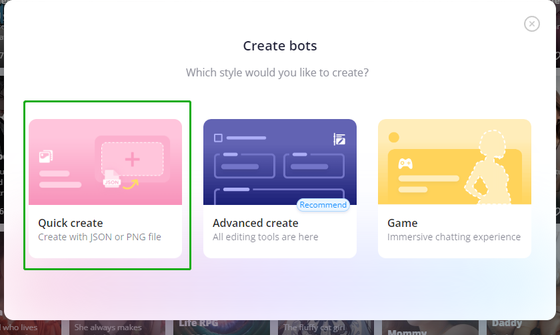
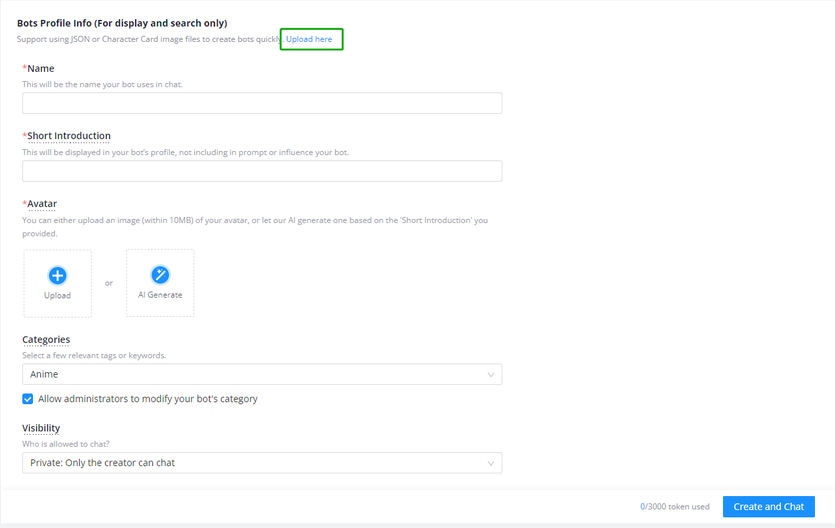
The documented creation flow begins with a straightforward choice between creating a new bot and using an upload route. A separate advanced view exposes fields for a name, description, greeting and persona. These fields are easier to write when each has one job. Use the description for durable facts, the greeting for the opening moment and the persona for behavioural guidance. Avoid packing every plot event into the greeting; leave space for interaction.
Write a short test conversation after setting up a character. Check whether the character maintains its voice, respects the scenario and responds at the desired length. If it drifts, revise the persona with direct, positive instructions. “Answer in two or three paragraphs and ask one relevant question” is more actionable than a vague request to be engaging. Save major changes in small steps so you can identify which instruction improved or weakened the result.
Good prompts provide context, intent and a useful next action. Instead of sending a single-word greeting, establish where the scene begins and what you want from the response. You can also ask the character to summarise the current situation when a conversation becomes long. This creates a compact checkpoint and helps you restate the important facts. When consistency matters, repeat essential names, relationships or rules in plain language.
Use the available persona and memory-related controls deliberately rather than adding instructions everywhere. Put stable preferences in the most persistent field and keep temporary scene directions in the conversation. If an answer misses the mark, explain the correction in one sentence and continue. As with any generative system, outputs can be inaccurate or unexpected, so verify practical information separately and do not rely on a character for professional decisions.
Treat character chat as a creative tool, not a private vault. Do not enter passwords, financial details, confidential work material or information that identifies another person. Review the current privacy controls and terms before sharing personal context. Set boundaries early in roleplay and change direction if a response becomes uncomfortable. The profiles selected for this guide are adult-presenting and non-sexualised, but the wider catalogue is user-generated and may vary.
Joyland's help pages document chat, character creation and supporting controls, while individual profile pages show how varied the catalogue can be. This guide was checked against those first-party pages on 15 October 2026. Product interfaces and content can evolve after that date. Use the current on-screen labels as the final reference, keep expectations flexible and take breaks during long sessions. A measured approach usually produces clearer prompts, more consistent characters and a better overall experience.
Discover adult character styles, explore documented creation controls and use a practical framework for more focused chats.
Selected conservatively from first-party profile pages. All shown characters were reviewed as clearly adult, fully clothed and non-sexualised.
A calm, contemporary profile with a reflective visual style.

Two clearly adult characters in a polished contemporary portrait.

A fully clothed adult workplace duo in a clear narrative scene.

A clearly adult royal character with a dramatic fantasy portrait.

A detailed fantasy profile with a polished illustrated portrait.

A mature male profile with a restrained, cinematic presentation.
These first-party help-centre views show the create-bot choice and the advanced character fields.
Choose a profile whose description fits the tone and scenario you want.
Give context, boundaries and one useful next action in your opening prompt.
Correct tone or length with direct instructions and keep important facts visible.